← Back to Solutions
Desktop Application Completed

Task Workspace Manager

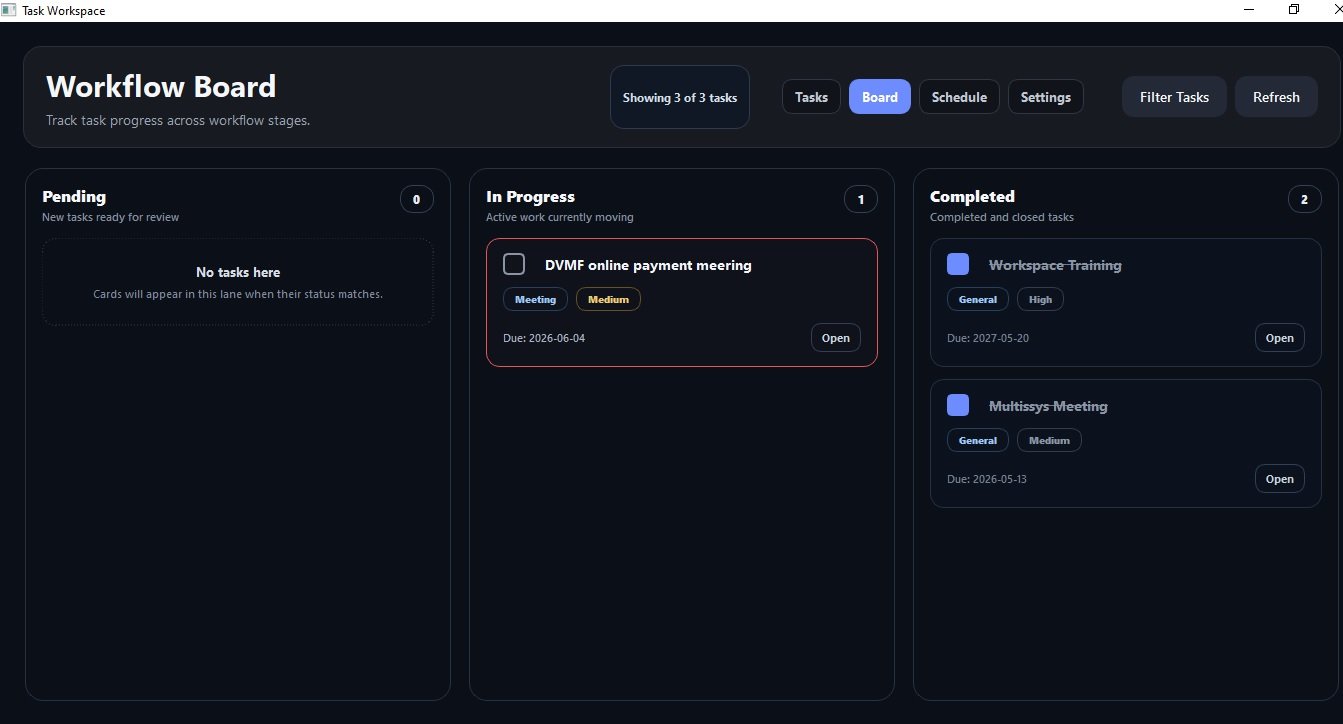
Task Workspace Manager is a desktop application that helps businesses improve productivity by organizing tasks, tracking workflows, and managing schedules efficiently.

Task Workspace Manager screenshot preview
Project Overview

What this project is about

Task Workspace Manager offers a reliable desktop solution designed to streamline task and workflow management for professional environments. It provides users with organized views to track progress and deadlines, ensuring important activities stay on schedule. The application integrates task scheduling and workflow tracking, enhancing day-to-day operational efficiency.

Built with Python and PyQt5, and backed by a lightweight SQLite database, this tool delivers a responsive and user-friendly interface suitable for various business tasks. By centralizing task management, it enables teams to reduce missed deadlines and improve coordination. The solution supports better time management and accountability through clear task visibility and status updates.

Key Features

What visitors should notice

  • Task Workspace Manager offers a reliable desktop solution designed to streamline task and workflow management for professional environments
  • It provides users with organized views to track progress and deadlines, ensuring important activities stay on schedule
  • The application integrates task scheduling and workflow tracking, enhancing day-to-day operational efficiency
  • Built with Python and PyQt5, and backed by a lightweight SQLite database, this tool delivers a responsive and user-friendly interface suitable for various business tasks
  • Built using Python, SqlLite, PyQt5 to support a practical and maintainable system workflow.
Development Highlights

How the work is presented

  • Designed as a practical portfolio solution with clear public-facing presentation.
  • Structured to explain both the business purpose and the system implementation.
  • Organized for easier review by non-technical visitors, clients, and recruiters.
  • Positioned under Desktop Application to clarify the type of problem it addresses.
  • Technology stack is presented in grouped sections for easier scanning.
Technology Stack

Tools and technologies used

Backend / Application
Python
Database / Storage
SqlLite
Other Tools
PyQt5
System Preview

Screenshot

Task Workspace Manager screenshot